- How to View: Press
Ctrl + Shift + Escto open the Task Manager > Click the Startup tab. - Function: This list displays all programs that are configured to launch automatically when Windows starts.
- Optimization Tip: Unnecessary applications launching at boot-up are a major cause of slow boot times. Find programs you rarely use (check their "Startup impact"), select them, and click "Disable" in the bottom-right corner. This is one of the most effective ways to improve boot speed and system responsiveness.
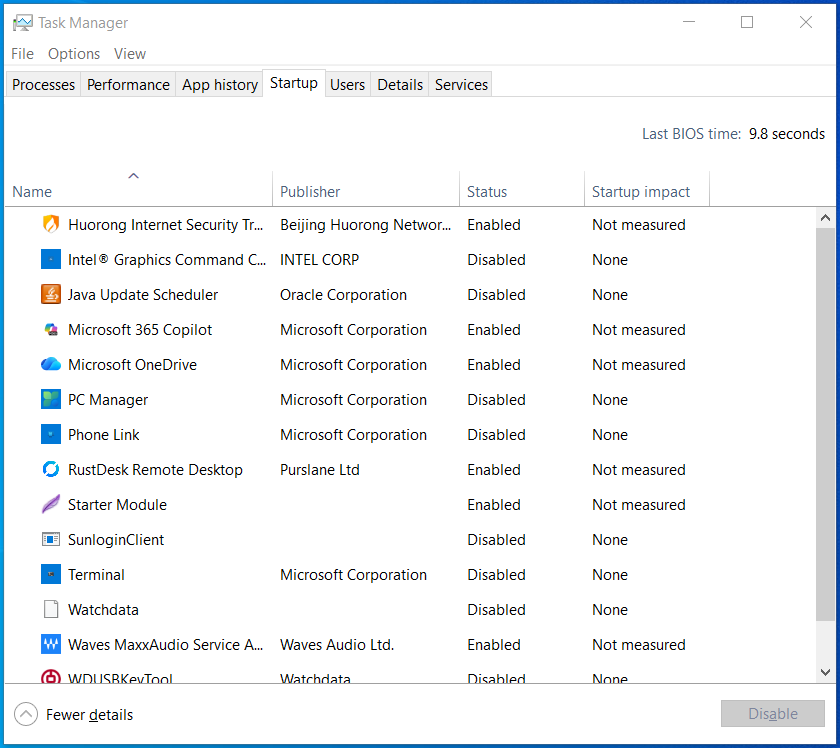
Open Task Manager and select the Startup tab. Check the Status column (Enabled / Disabled) and Startup impact, select an app, then use Disable or Enable at the bottom.